
What do you need help with?
1Before you pay
Buying a gift card
Every business on Instagift has its own store. You choose an amount, check out, and the card is in your account right away.
Why do I have to sign in to buy?
Your account is where your cards are kept, so you can print one, send one or use one whenever you like. One free account works at every Instagift store. Create it with your email address and a password, or with Sign in with Google.
It says there is already an account with my email address.
Then you have one already, from something you bought or a gift you claimed. Sign in with that address. If you do not remember the password, use Forgot password? on the sign-in page.
How can I pay?
With a Visa, Mastercard, American Express or Discover card. The card is saved to your account, so next time you do not type it again. You can remove it whenever you like (part 8).
What will the charge say on my statement?
The checkout page tells you before you pay, in the line that starts "Your credit card will be charged by", and the page after your order says it again. It is Instagift's name, or the store's own.
Where is my card after I buy it?
In My Orders, as soon as the order goes through. We also email you a confirmation.
Will anything come in the mail?
No. An Instagift is not a plastic card. You print it, email it to someone, or use it from your phone. If a business also sells plastic cards, ask them directly.
2Your cards
Find and print your card
Everything you have bought or claimed is on one page, My Orders, at instagift.com/print.
Available to Redeem
The cards you can still use. Start here.
All Orders
Everything, including cards that are used, expired or given away, with the status of each.
Gift Manager
The gifts you have sent, and whether each one has been claimed (part 4).
How do I print a card?
On a computer, open My Orders and press Print Now beside the card, then Print. Or press Printable PDF to download it as a file. On a phone, tap the three dots beside the card and choose Printable PDF.
It says Printing Required, or Print to redeem.
That card cannot be used from a phone. Sign in on a computer and print it.
It says Mobile Redeem Only, or Must Redeem In App.
That card is used from your phone and cannot be printed. Mobile Redeem Only works in your phone's browser or in the Instagift app. Must Redeem In App works only in the app.
What does Mark as Printed do?
It is a note for yourself that you printed the card. It does not print anything, and a card marked as printed can no longer be emailed as a gift.
I do not see my card.
Look under All Orders, which also lists used and expired cards. If it was a gift, make sure you claimed it (part 5) and that you are signed in with the same email address you claimed it with.
3At the business
Use it at the business
Hand over the printed page, or use the card from your phone. Your phone is the only way to use part of a card and keep the rest.
- Open the card on your phoneIn the Instagift app, or sign in at instagift.com/print in your phone's browser and tap the card.
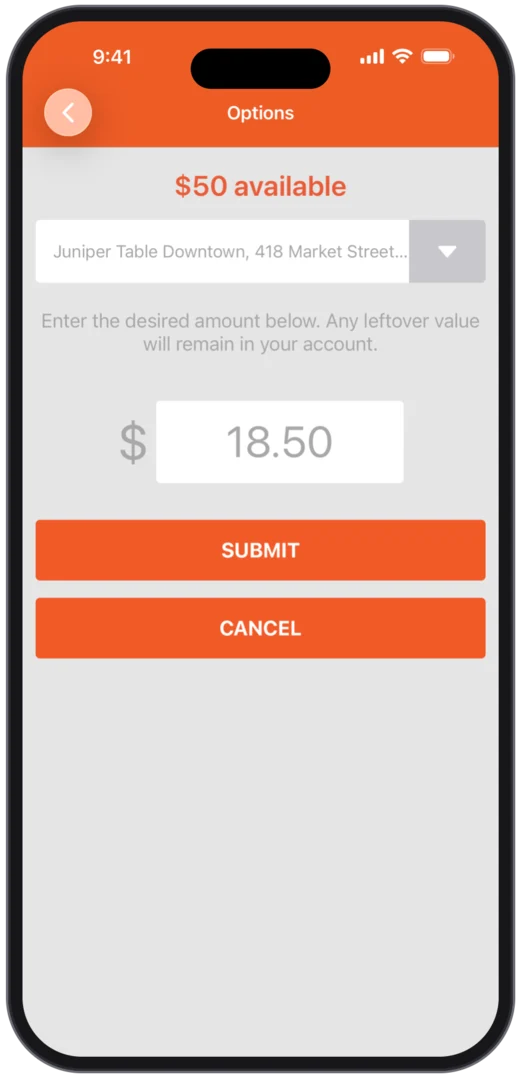
- Choose where you areOnly if the card is good at more than one place. Pick the location from the list.
- Choose how muchUSE ALL for the whole card, or USE SOME and type the amount of your bill.
- Tap MARK AS USED and confirmDo this at the counter, when you are paying. You cannot undo it yourself.
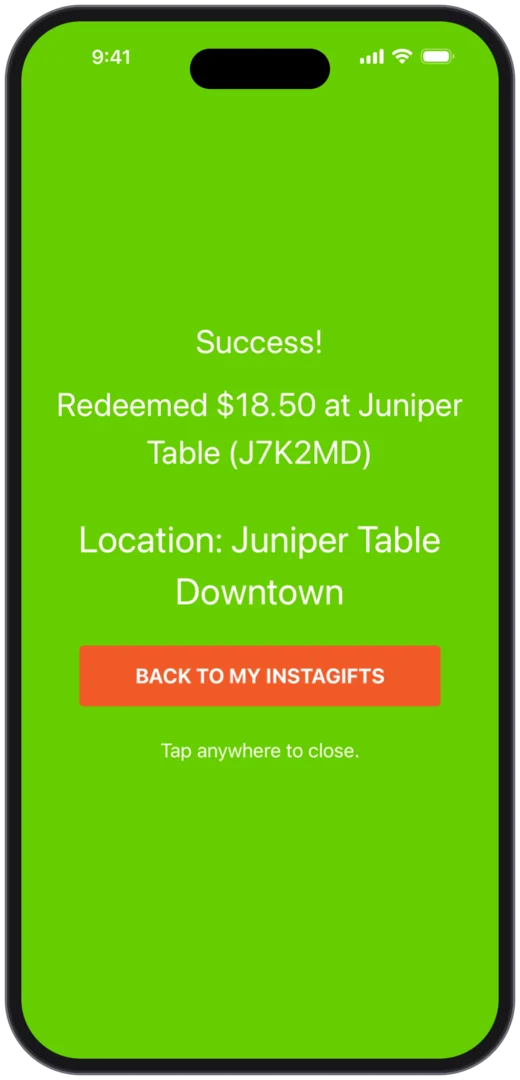
- Show the green screenIt says Success, with the amount and the card's code. The business takes that amount off your bill.
Good to know
Can I just hand over a printed card?
Yes. The business scans it or types in its code. A printed card is used in full, once, and the business will not give change. If your bill is smaller than the card, use the card from your phone and choose USE SOME.
Where does the rest of my card go?
It stays in your account as a card of its own, with a new code. A page you printed before is used up, so print the new card if you want it on paper.
Do I need the app?
Only for a card that says Must Redeem In App. For every other card the website does the same thing in your phone's browser. The app is called Instagift, it is free for iPhone and Android, and it keeps you signed in. App Store or Google Play
There is no USE SOME on my card.
That card must be used in full. Some bonus cards and vouchers are set that way by the business.
Can I turn one card into two?
Yes, when the business allows it. In My Orders, press Split Value under the card, choose the amount for the new card and press Submit Split. Each card gets its own code. A split cannot be undone.
I marked my card as used by mistake
Can I get it back?
Only the business can undo it, and you can ask them from your account for 24 hours. Sign in on the website, open My Orders, then All Orders, and press Redeemed by mistake? under the card (on a phone it is under the three dots). Say what happened and press Tell the business. They decide, and your card stays used until they do.
It has been more than 24 hours.
Write support@instagift.com with the card's code and what happened.
4Giving
Send it as a gift
Email a card to someone when you buy it, or any time after. They get an email with a claim code, and the card moves to their account when they claim it.
When you buy
On the store's page, choose to email it as a gift. Enter their name and email address and your message, and choose to send it right after your purchase or on a future date. A gift for a future date goes out early that morning, Eastern time.
Later, from your account
In My Orders, press Email as a Gift beside the card. You get an email when the gift is sent. A card you marked as printed, or one that has expired, cannot be emailed.
I typed the wrong email address.
You can fix it yourself until the gift is claimed. Open My Orders, then Gift Manager. Press Cancel Gift: the card comes back to your account and the email you sent stops working. Then send it again to the right address.
They never got the email.
Ask them to look in their spam or junk folder first. Then open Gift Manager and press Update and Re-Send Gift. You can change the address there, such as from a work address to a personal one.
Can I see what was sent?
Yes. In Gift Manager, press View Gift Email.
Someone else claimed my gift.
Once a gift is claimed, only we can help. Write support@instagift.com with both email addresses.
Can I print it and hand it over?
Yes. Print the card (part 2) and give them the page. Whoever holds the page can use it, so treat it like cash.
5Receiving
Claim a gift you received
Someone emailed you an Instagift. Claiming it puts the card in your own account.
- Open the email and press the buttonOr go to instagift.com/claimgift.
- Sign in, or create a free accountWith your email address and a password, or with Google.
- Enter the Claim Code and press SubmitThe code is in the email. If you came from the email's button, it is already filled in.
- Find the card in My OrdersPrint it, or use it from your phone (part 3).
Why do I need an account to claim a gift?
So the card is yours alone. Once it is in your account, nobody else can claim it, you can use it from your phone, and anything you do not spend stays there for next time.
What does a claim code look like?
Three groups of letters and numbers with dashes between them, like 7KDM-QX3A-H4TR9C. Yours is in the gift email.
It says the code was not found.
A claim code works once. If you already claimed the gift, the card is in My Orders on the account you used that day. Otherwise check the code against the email, letter by letter.
6Dates
Expiration dates
A gift card you pay for does not expire. A card you were given for free can.
Gift cards
A gift card you buy does not expire. If a card of yours has a date, it is printed on the card and shown beside it in My Orders.
Bonus cards
A free card a business gives with a purchase, such as a holiday offer. It can have an expiration date and rules of its own, printed on the card under Terms & Restrictions.
Discount vouchers
The promotional value has a date. What you paid never expires. Part 7
A card with a date is marked Expiring Soon in My Orders during its last 30 days. An expired card moves from Available to Redeem to All Orders.
Back to the list7Restaurant group sales
Discount dining vouchers
Some restaurant associations sell vouchers for their members at a discount. Each voucher is for one restaurant, and the association sets the rules.
Where are the vouchers I bought?
In My Orders, with everything else you have bought. Sign in with the email address and password you used at checkout.
Why do I have to sign in to buy?
Your vouchers are kept in your account, so you can buy today and print or use them later. If it says there is already an account with your email address, you have one: sign in, or use Forgot password?.
Can I show a voucher on my phone?
It depends on the sale. A voucher tagged Print to redeem must be printed from a computer. Others open on your phone and are used the way a gift card is (part 3).
Does a voucher expire?
Its promotional value does, on the date shown on the voucher. What you paid does not. After the date, a $50 voucher you bought for $35 is worth $35 at the restaurant.
What are the rules?
They are the association's, and they are printed on the voucher: often one voucher per table, dine-in only, and not for alcohol, tax or tip. Please tip on the full bill.
How many can I buy?
The sale page shows a Limit Per User for a restaurant when there is one.
8Signing in
Your account
One account, for every Instagift store and for the app. Your details are under Personal Info once you are signed in.
I forgot my password.
Go to instagift.com/users/forgot_password, enter your email address and press Reset Password. We email you a link that works once and lasts 30 minutes. If it does not come, check your spam folder.
How do I change my password or my email address?
Sign in and open Personal Info. Your email address is on the Profile tab, and your password is on the Password tab.
Can I sign in with Google?
Yes. Press Sign in with Google on the sign-in page. If you already have an account under the same email address, Google signs you in to that one.
I signed up with Apple in the app. How do I sign in on the website?
Sign in with Apple is only in the app. For the website, use Forgot password? with the email address on your account to set a password.
How do I change or remove a saved credit card?
Sign in and open Personal Info, then Credit Cards. You can add a card, choose which one is used first, or delete one. A card cannot be edited: delete it and add it again.
How do I delete my account?
9Money
Refunds and charges
Ask within five days and we refund a card you have not used, for any reason.
How do I get a refund?
Write support@instagift.com within five days of buying, with the email address on your account and the card's code. We refund any card you have not used. After five days a sale is final, with the exceptions in our refund policy.
A business would not take my card.
Write to us with the name of the business and the card's code. We will sort it out with the business, and our refund policy covers a valid card a business refuses.
I do not recognize a charge from Instagift.
It is most likely a gift card, a voucher or an event ticket that you or someone in your household bought from a local business. Please read Why did Instagift charge my credit card? and write to us before you dispute it.
Still stuck?
Write to us and we will sort it out.
Write to us
support@instagift.com, from the email address on your account if you can.
Tell us three things
The email address on your account, the business, and the code on the card. We can find it much faster with those.